
Coming soon Artist tier
Turn any photo into a tattoo stencil
The Artist tier adds AI stencils and drawing tools to Tatscale. Pick a photo and a style, refine the lines on your iPad, then print at true scale. Join the waiting list and we’ll tell you the moment it’s ready.
We’ve sent you a confirmation, and we’ll email you as soon as the Artist tier is ready. If you don’t see it, check your spam folder.


- #342315
- #573C22
- #785734
- #9E754C
- #C0966C
- #DCBB98
Early previews from the Artist tier in development · Photos: Pixabay
01 Before and after
More from photo to stencil.
Early output from the Artist tier, across all three styles. Swipe through, or use the arrows.
-


CatHyperrealism
-


OwlLine
-


SnakeHyperrealism
-


DogLine
-


LynxHyperrealism
-


HorseLine
-


LeopardOutline
-


Torii gateLine
-


EyeHyperrealism
-


CatrinaLine
-


EagleLine
-


PuppyOutline
-


TreeLine
-


LetteringHyperrealism
Early previews from the Artist tier in development · Photos: Pixabay
02 AI Stencil
Three styles, one photo.
Choose how the stencil is drawn. Here is the same photo in each style.
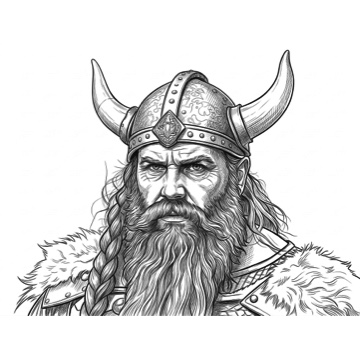
Hyperrealism
Every strand drawn, with fine cross-hatching for shadow.
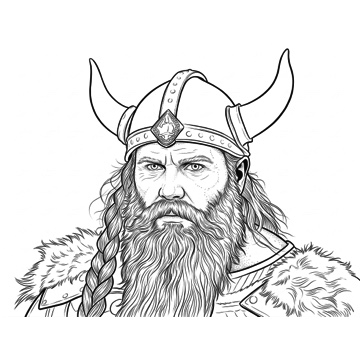
Line
Bold outlines and flowing strands, with light stipple shading.
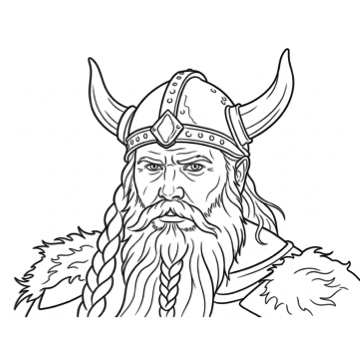
Outline
Clean outlines only, with no shading.
03 Made for your subject
Tell it what’s in the photo.
Each subject is drawn its own way: a portrait keeps the likeness strict, lettering is traced as it is. Flash and finished designs can be redrawn in any style too.
- PersonThe likeness is kept strict.
 AnimalFur and feather detail drawn as lines.
 ObjectEdges and surface detail drawn as lines.
 LetteringLetterforms traced as they are.
04 Refine it yourself
Draw, erase and adjust on your iPad.
The stencil lands on your canvas as layers, ready to work on with Apple Pencil.
- brush
Brush
Add your own lines, with a choice of brushes.
- eraser
Eraser
Take out anything you don’t want, from fine detail to whole areas.
- layers
Layers
Each part of the design on its own layer. Hide, lock, group or reorder them.
- line weight
Line weight
Make the lines thinner or thicker, for the whole stencil or a part you select.
- colour
Colour
Change the colour of the lines, or of what you draw.
- move
Move
Move and place each layer exactly where you want it on the canvas.
05 What’s included
Everything in one plan.
Artist
- 30 AI renders every month
- All three styles and every subject
- Brush, eraser, layers, line weight and colour
- Everything in Pro
Everything in Pro
- Unlimited prints
- Unlimited PDF exports
- Unlimited saves to Photos
- True 1:1 scale and tiling across sheets
06 Waiting list
Be first to try it.
No release date yet. Leave your email and we’ll let you know as soon as the Artist tier is ready.
We’ve sent you a confirmation, and we’ll email you as soon as the Artist tier is ready. If you don’t see it, check your spam folder.
The Artist tier is in development and not available yet. Features may change before launch. Needs a recent iPad.